If you are often busy and cannot monitor the charts constantly, mastering how to set up MT4 alerts will completely change the way you trade. MT4 allows you to set up price alerts, indicator alerts and many other types of notifications, helping you react quickly to market fluctuations. This is a simple but extremely powerful tool for any trader.
Alerts on MT4 are a feature that helps traders receive notifications when important events occur in the market. Users can customize specific conditions so that the platform automatically sends alerts when the price or signal reaches a predetermined level.
When an alert is triggered, MT4 will notify you with a sound, a pop-up window, or a message displayed on the chart. Users can also choose to receive notifications via email or SMS in the platform settings. The system will send a signal immediately when the pre-defined conditions are met. MT4 supports setting up alerts for many different markets such as Forex, stocks, precious metals, or crypto, giving traders maximum flexibility.
Since market prices are constantly changing, traders often activate alerts to let them know when an asset reaches a desired price. This feature helps them not to miss important signals and still monitor the market effectively while focusing on other activities.
Why should traders activate market alerts?
Why should traders activate market alerts?
Understanding how to set up MT4 alerts will help you react faster to strong market fluctuations. In Forex, stocks or commodities trading, even a few seconds of delay can directly affect profits. When you set up alerts on MetaTrader 4, the platform will automatically send alerts when prices change or when important news appears. This way, you can take timely action without constantly monitoring the screen.
Don’t miss out on trading opportunities: With the speed of market volatility, setting up price alerts is the solution to ensure that traders don’t miss out on golden opportunities. Alerts send notifications as soon as the price reaches important levels such as support or resistance. This gives you absolute control, allowing you to execute orders at the exact entry point determined by your strategy.
Price fluctuation notifications: When enabled, the system will notify you as soon as the price hits the level you set. This ensures you can execute Limit or Take Profit orders accurately.
Place orders: Set up alerts to be instantly notified of the status of your orders. Whether your order is executed, canceled, or modified, you will be notified. This is convenient, allowing you to easily monitor your entire portfolio without having to constantly open the app.
Economic and market updates: You can set up alerts so you don’t miss out on Economic News or major Market Events. The system will notify you immediately about impactful reports. This helps traders prepare in time for major price movements.
Monitor your account status: Low balance or margin alerts are important to protect your capital. Knowing how to set up MT4 alerts for your account parameters will help you stay away from margin calls. By receiving timely notifications, you stay in control of your account status and potential risks.
Types of alerts on MT4
Below are the most important types of alerts on MT4 that traders should be aware of.
Price alerts: This is a trading point optimization tool. It automatically notifies you when an asset reaches a price level that you have set in advance. This is extremely useful for executing precise entry or exit points according to your strategic plan. For example, you can set an alert to be notified when the EUR/USD pair reaches exactly 1.1500.
Technical Indicator alerts: These alerts help you receive automated trading signals from tools like Moving Average (MA), RSI or MACD. You can set alerts to trigger when specific indicator conditions are met, for example when RSI crosses a certain threshold, an alert will sound when RSI crosses below 30, signaling oversold.
News alerts: You can set up MT4 to receive notifications of important market news. This alert system ensures that traders do not miss out on economic events that could have a significant impact on their trading positions. For example, alerts will be triggered in time when a scheduled event, such as a jobs report, is about to be released.
Time alerts: This feature allows traders to receive notifications at set time frames or intervals. This supports time-based trading strategies or reminders to check the market. For example, you can set up an hourly alert to remind you to check your charts and evaluate the latest price movements of the assets you are tracking.
Email alerts: When set conditions are met, email alerts will be sent directly to your inbox. This allows you to stay informed of important market factors on the go.
How to set up MT4 alerts on desktop and mobile
To monitor the market and act promptly, price alerts are essential. Learning how to set up MT4 alerts on the MT4 platform is extremely simple. Just install it, you will receive notifications when there are important price events, helping to optimize your strategy.
MT4 alert settings on PC
Step 1: Access terminal in MetaTrader 4
How to set up MT4 alerts on desktop
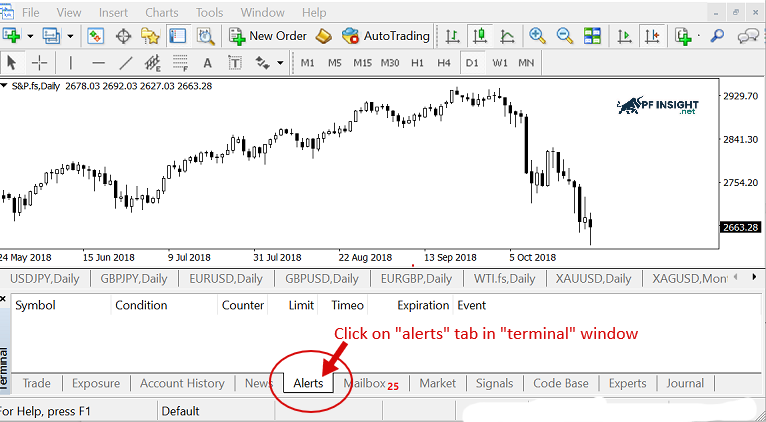
First, log in to MT4 and open Terminal at the bottom of the screen using the CTRL+T shortcut, then switch to the Alerts tab.
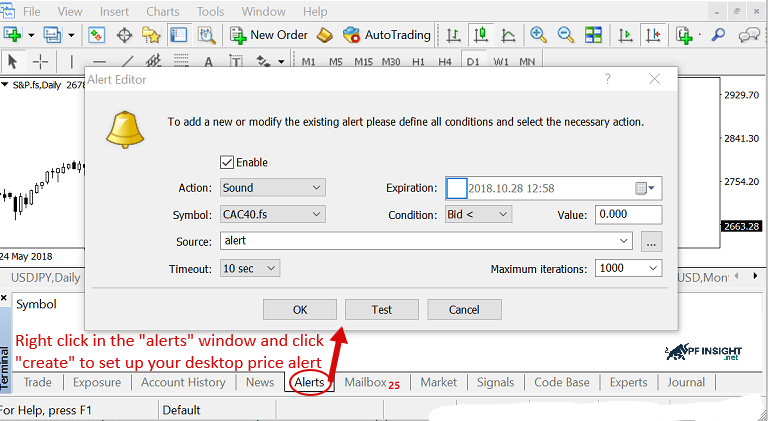
Next, right-click on the empty area in this tab and select Create.
This action will open the Alert Editor window where you can set up and customize the conditions for MT4 to send alerts according to your trading needs.
Step 2: Customize the parameters for the alert
Customize the parameters for the alert
Once the Alerts window is open, simply right-click on an empty space and activate the menu. Select the “Create” option to open the configuration dialog. In the Alert Editor, set the parameters one by one:
Select asset: Identify the currency pair or asset you need (e.g. EUR/USD).
Select condition: Decide when the alert is triggered, with options like Bid above current or other thresholds.
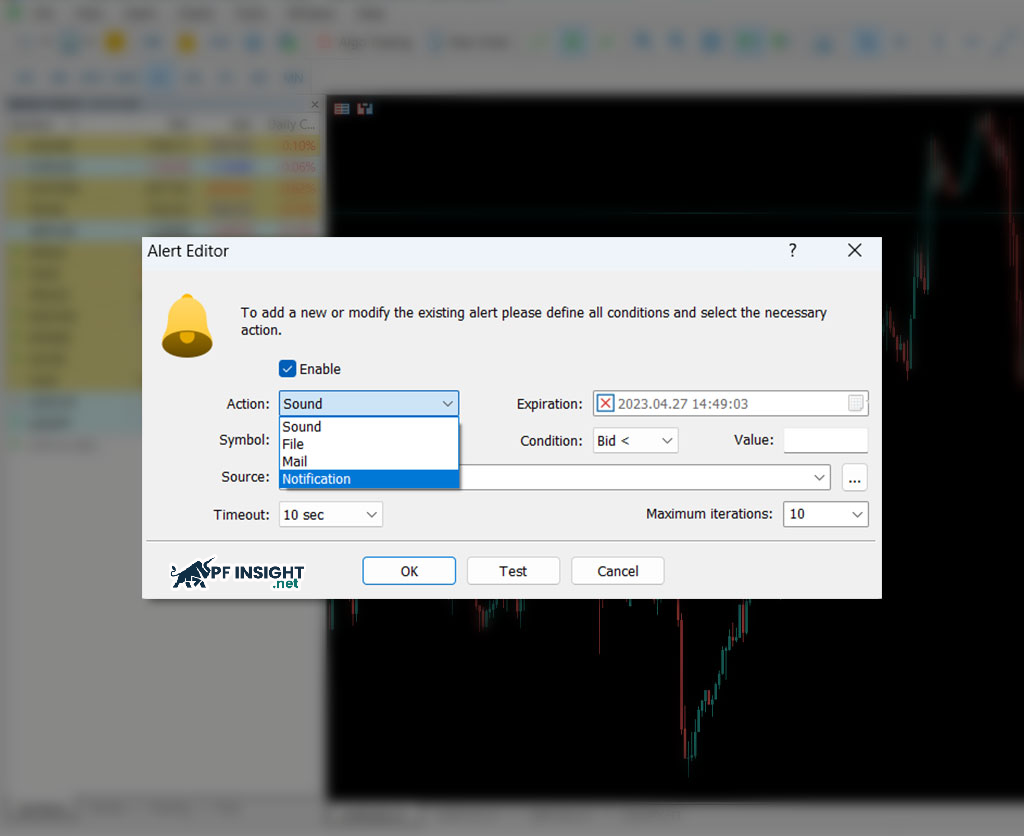
Source: You have the option to choose whether to receive notifications by sound, email, or push notification to your mobile device.
Note: Don’t forget to set the Maximum number of triggers this alarm is allowed to sound before it automatically stops.
Step 3: Select the notification type on MT4
Select the notification type on MT4
Once you have set up your alert conditions, the next step is to choose how you will receive notifications. You can receive alerts via email, SMS, or push notifications on your mobile device.
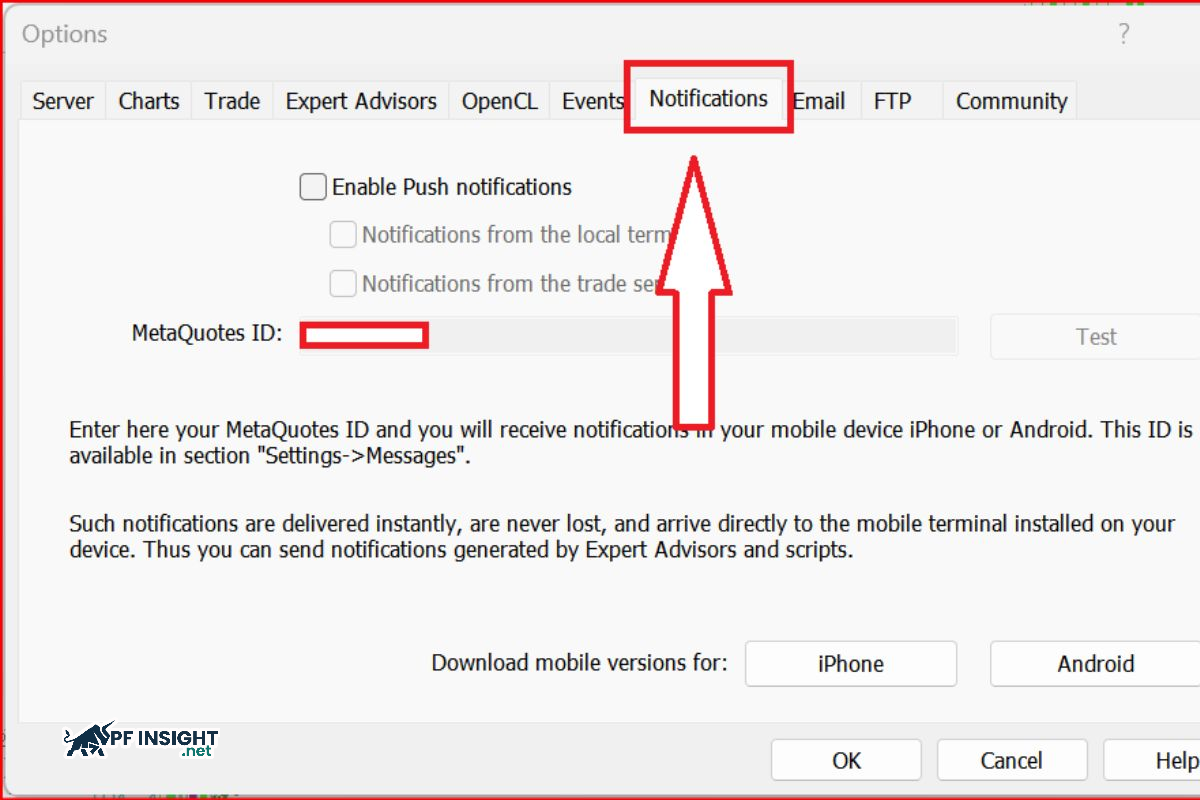
To configure, go to Tools > Options on MT4, then select the Alerts or Email tab.
Here you can enter details like your email address or set up your phone notification preferences, ensuring MT4 sends alerts in the correct way.
Step 4: Enable alerts on MT4
Enable alerts on MT4
Once all the conditions for the alert have been set, click OK to complete creating the alert.
The alert will then automatically enable and display in the Alerts tab, ready to send a notification when the condition is met.
From this tab you can monitor, edit or delete alerts at any time depending on your trading needs.
Set up MT4 alerts on your phone
How to set up MT4 alerts on your mobile app to get instant price notifications on the go. This guide will show you how to set up alerts on MT4 mobile, helping you track market movements on the go.
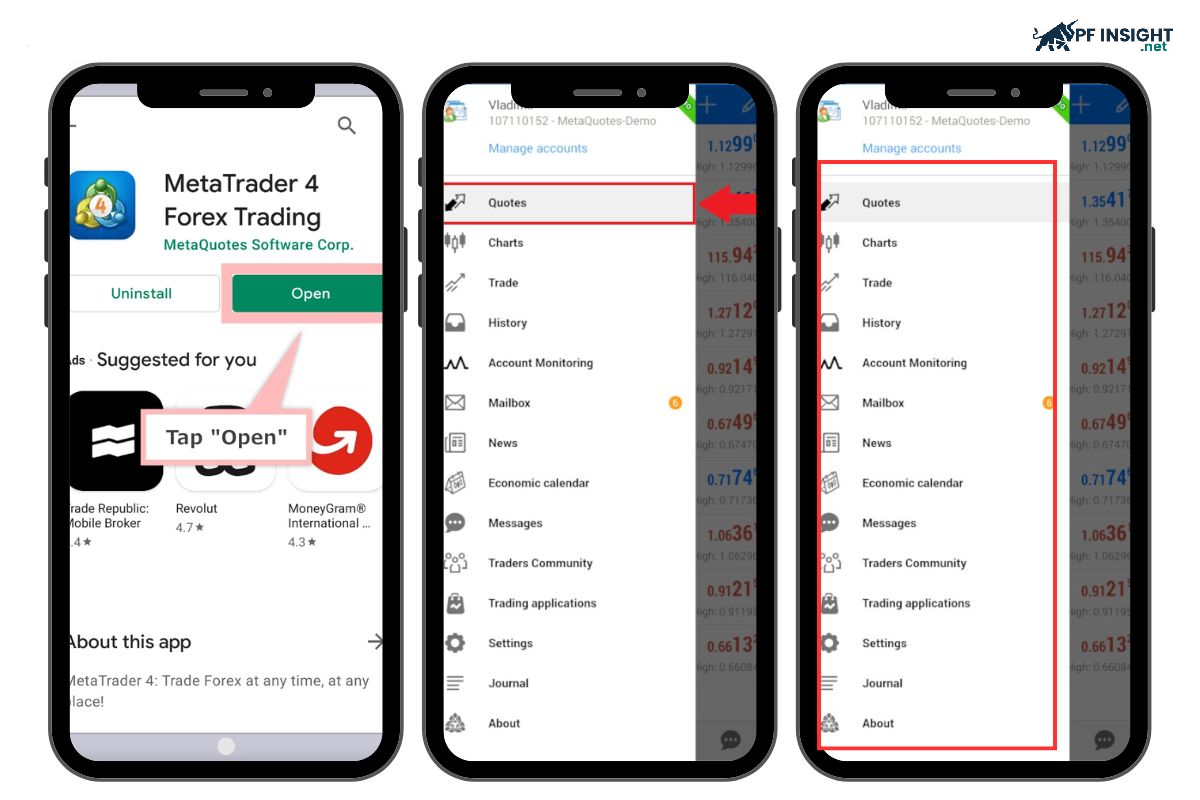
Step 1: Access the MT4 Mobile application
Set up MT4 alerts on your phone
Open the MT4 app on your phone, be it an iOS or Android device.
Make sure you are logged into your trading account before proceeding.
Step 2: Select the trading instrument to create the alert
Once logged in to MT4 Mobile, identify the asset you want to track. This can be a currency pair, cryptocurrency, or commodity.
You can find the desired tool through the following items:
Market Watch: Displays a list of assets with real-time updated buy/sell prices.
Charts Tab: Provides visual analysis with price charts and technical indicators of the selected instrument.
Tap on the desired asset to set an alert, and make sure you have full access to details like charts and prices.
Step 3: Go to Menu to create new alert
Go to Menu to create new alert
Depending on your device and MT4 version, there are multiple ways to access the alerts menu.
Depending on the device and MT4 version, the way to access alerts may vary:
Tap the three dots icon next to the asset name in the Market Watch list.
Alternatively, tap and hold on the instrument on the Market Watch or Charts tab. Then, from the menu that appears, select “Alerts” or similar to continue.
Step 4: Set alert conditions and parameters
In the Alert Settings interface, you need to configure the following elements:
Trigger Value: Defines the specific Price Level at which the alert is triggered (e.g. when EUR/USD hits 1.1000).
Market Criteria: Select the trigger condition. Options include price (Bid/Ask) going above/below a level, or changing by a certain percentage.
Receive Method: Select the type of notification you want, such as Sound, Vibration, or Push Notification to your phone.
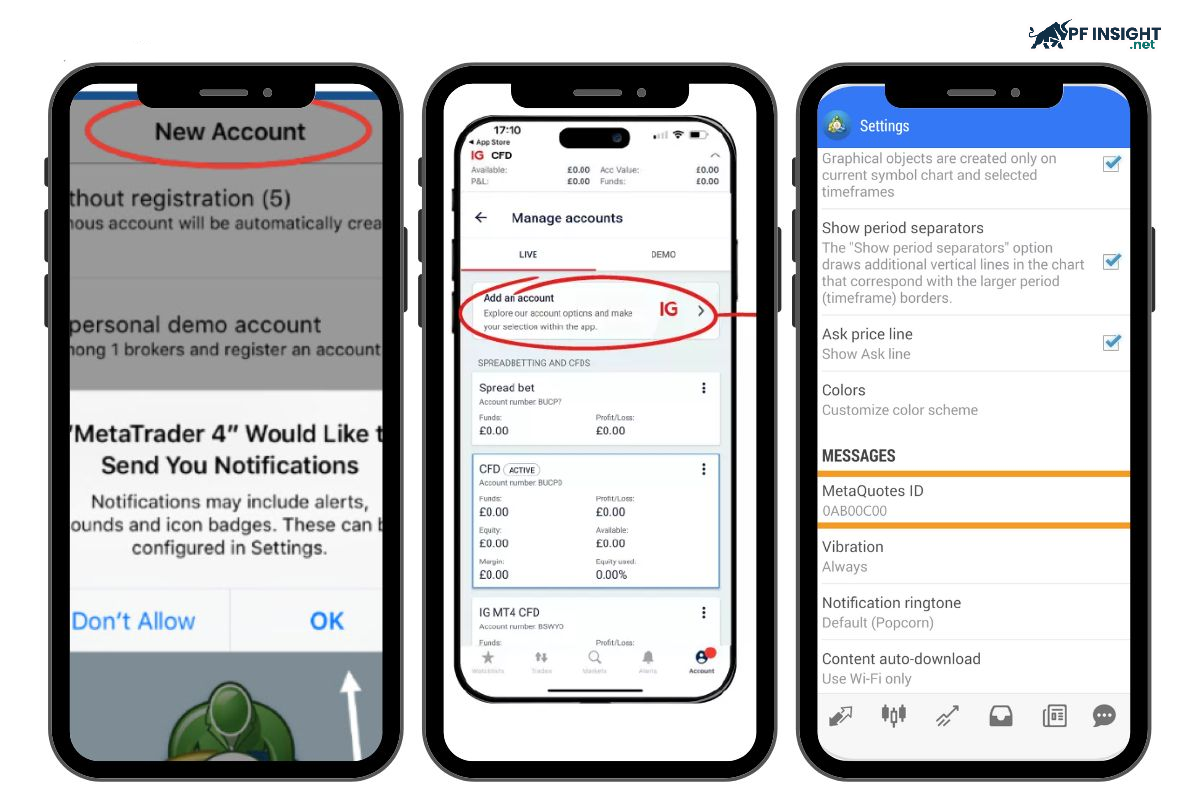
Step 5: Turn on push notifications
To receive alerts even when you do not have your MT4 application open, it is important to enable Push Notifications. The procedure is as follows:
Go to settings in the MT4 mobile app.
Go to messages or notifications.
Enable push notifications to stay informed about market events
Some frequently asked questions about how to set up MT4 alerts
Below are some frequently asked questions to help you better understand how to set up MT4 alerts and how to operate the alert system on the MetaTrader 4 platform.
Does MT4 allow setting alerts from custom indicators?
Yes. MT4 allows you to create alerts based on your custom indicators. However, this depends on whether the indicator has built-in alerting functionality. You will need to review the options in the indicator’s settings to set up alerts.
How do I modify or delete a created alert?
Modifying or deleting created alerts on MT4 is very simple and is done directly in the Alerts window.
Edit: Double-click on that alert in the Alerts tab to reopen the configuration window.
Delete: Right-click on the alert and select “Delete”, or press the Delete key on your keyboard.
Is it possible to set alerts for multiple currency pairs or markets at the same time?
Yes, there is no limit on the number of devices. You just need to repeat the steps in the how to set up MT4 alerts guide for each phone or tablet. This provides maximum flexibility to monitor the market anytime, anywhere.
Is there a limit to the number of alerts on MT4?
MT4 does not have a strict limit on the maximum number of alerts that can be set up. However, if you set too many, your ability to manage effectively will be significantly reduced. Therefore, you should only set up alerts that are crucial to the success of the trading strategy you are pursuing.
Conclude
Mastering how to set up MT4 alerts allows you to trade more proactively without constantly watching the charts. Accurate and timely alerts help you make decisions with confidence and take advantage of every price movement. According to PF Insight, whether you are a beginner or a professional trader, using this feature effectively will improve the quality of trading in the Forex market.